Invoice app for Android: ProFaktura on your phone
Updated · ProFaktura editorial team
ProFaktura for Android lets you create an invoice on your phone and send it to your client straight away, no laptop needed. The app is built for freelancers (zzp) and small businesses in the Netherlands. Invoices meet the Dutch invoice requirements, the GPS mileage log keeps running with the screen off, and you add receipts with a photo. You start for free, and the Free plan has no limit on invoices. Below we explain what the app does on Android, which permissions it asks for and why.
Free app, about 3 MB, Android 7.0 or newer. Prefer to try it in your browser first? Create a free account.
Why a real app and not just a website
Many invoicing tools are, on a phone, simply a website in a frame. That is fine for an invoice, but not for everything. ProFaktura for Android is a native app, so it can do three things a website cannot:
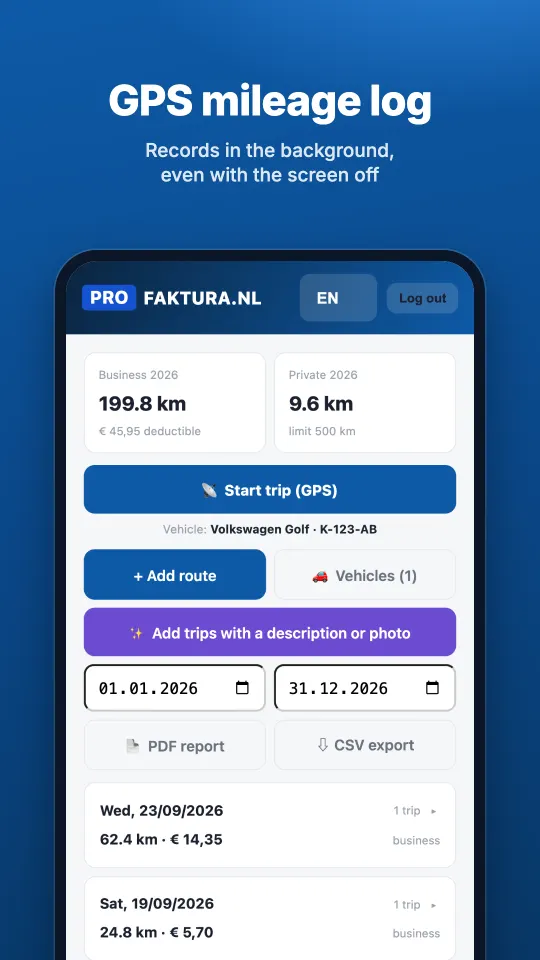
- Background GPS. The mileage log keeps counting when you turn off the screen, switch apps or put the phone in your pocket.
- Notifications. You get a notification when an invoice is past its due date, even when the app is closed.
- Camera and microphone. You photograph a receipt from inside the app and can dictate a note for a trip instead of typing.
It is one account on your phone, tablet and computer. What you enter on Android during the day is also there in the evening at profaktura.nl/app in your browser.
Creating an invoice on Android in five steps
- Business details. Once: name, address, KVK number, VAT ID and IBAN. The KVK number and VAT ID are checked for the right format straight away.
- Client. Pick one or add a new one: name, address and email. For a business client in the EU you also add their VAT number.
- Lines. Description, quantity, price and VAT rate (21%, 9% or 0%). The app calculates the totals, including reverse charge (btw verlegd) and the KOR.
- Check. If something the law requires on an invoice is missing, the app tells you exactly what and where to add it.
- Send. The invoice gets the next number and goes to your client by email as a PDF. You can also download it as an e-invoice (UBL file).
Once you are used to it, this takes less than two minutes, for example on the train home from a job. What has to be on a Dutch invoice: how to invoice in the Netherlands.
A GPS mileage log that keeps running
This is where Android makes the difference. Tap Start trip, put the phone away and drive. While the trip runs, a notification sits in the status bar, so you always see that the app is using your location. When you arrive, tap Stop.
- No signal? Points are stored on the phone and sent once you are back online. A tunnel or a dead spot does not cost you kilometres.
- Business or private. After the trip you mark each leg as business or private, so a client visit and a stop at the supermarket stay separate.
- Driving your own car? In 2026 you can deduct € 0.25 per business kilometre. The app adds it up per month and per year.
- For your accountant. You export the log as PDF and CSV, with date, start and end address, kilometres and the purpose of the trip.
Tip for Samsung, Xiaomi and other brands: some phones close background apps to save battery. If ProFaktura asks you to turn off battery optimisation on your first trip, choose Allow. Otherwise the system may stop the trip halfway. The app only uses GPS during a trip you start yourself.
What the Dutch tax office expects from a mileage log: mileage log in the Netherlands.
Receipts and expenses: take a photo and you are done
A fuel receipt, tools or a lunch with a client: tap Add expense, take a photo and the app reads the amount, date and VAT. You only check that it is right. The photo stays with the entry, so the shoebox of receipts can go. At the end of the quarter one overview shows how much VAT you get back. Which costs you can deduct: business expenses in the Netherlands.
A notification when a client pays late
When an invoice passes its due date, you get a notification on your phone. From that invoice you send a reminder or a final notice with one tap. ProFaktura never sends anything to your clients on its own: you decide when and what goes out.
What is in Free and what is in Pro
| Feature | Free | Pro (€ 9.99 per month excl. VAT) |
|---|---|---|
| Invoices and credit notes | unlimited | unlimited |
| Sending by email as PDF | yes | yes |
| Client list and quotes | - | yes |
| GPS mileage log | - | yes |
| Expenses with a photo of the receipt | - | yes |
| Time tracking and quarterly VAT overview | - | yes |
| Your own logo, no ProFaktura line at the bottom | - | yes |
You can try Pro free for 30 days, without payment details. After 30 days you decide whether to continue. If you do nothing, you go back to Free and all your data stays.
Which permissions the app asks for and why
| Permission | What for |
|---|---|
| Location (also in the background) | only during a trip you start, for the mileage log |
| Notifications | overdue invoices and the running trip in the status bar |
| Microphone | only when you dictate a note for a trip |
| Camera or photos | only when you add a receipt |
The app has no ads and no trackers. Your data is stored on a server in the Netherlands. You can refuse any permission and the rest of the app keeps working.
Frequently asked questions
Is ProFaktura for Android free?
Yes. The app is free to download, and on the Free plan you create and send unlimited invoices and credit notes. The mileage log, expenses, quotes and VAT overview are part of Pro (€ 9.99 per month excl. VAT), which you can try free for 30 days without payment details.
Does the mileage log work with the screen off?
Yes. The Android app uses background GPS while a trip is running, with a notification in the status bar. On your first trip, turn off battery optimisation for ProFaktura, otherwise your phone may stop the app in the background.
Which Android version do I need?
Android 7.0 or newer. The app is about 3 MB and works on phones and tablets.
Can I use the same data on my computer?
Yes. Log in with the same account at profaktura.nl/app. Invoices, clients, trips and expenses are the same on every device. You can also give your accountant access.
Is the app available in English?
Yes. The app works in nine languages, including English, Dutch, Polish and Ukrainian. You can issue the invoice itself in Dutch, English, Polish, Ukrainian or French, whatever language the app is set to.
What happens to my data if I stop?
After the trial, or if you cancel Pro, you go back to Free and your data stays. You can download your whole administration as a ZIP. If you delete your account, your data is erased.
Last updated: 24 November 2026, ProFaktura for Android version 2.1.1. The € 0.25 per kilometre rate applies to 2026. This text explains how the app works and is not tax advice.
Your invoices and kilometres on your Android phone
Get it on Google PlayRead also: how to invoice in the Netherlands · mileage log · business expenses · VAT return